> For the complete documentation index, see [llms.txt](https://docs.besparks.co/llms.txt). Markdown versions of documentation pages are available by appending `.md` to page URLs; this page is available as [Markdown](https://docs.besparks.co/besparks-crm-gong-neng-mo-zu-shuo-ming/app-setup/app-setup-shopline.md).

# 將SHOPLINE會員串接到Besparks CRM

{% hint style="info" %}
若您為第一次使用Besparks CRM，請參照下列步驟將SHOPLINE的會員名單串接系統。此步驟只需操作一次，未來Besparks CRM系統將會自動更新官網新綁定LINE的會員名單。
{% endhint %}

## 將SHOPLINE會員串接到Besparks CRM

<mark style="color:orange;">**Step 1.**</mark> 登入SHOPLINE電商後台，前往顧客管理>顧客 頁面，點選左上方的「匯出顧客報表」

<figure><img src="/files/W9gyhoKZ0kbAt93xbrHU" alt=""><figcaption></figcaption></figure>

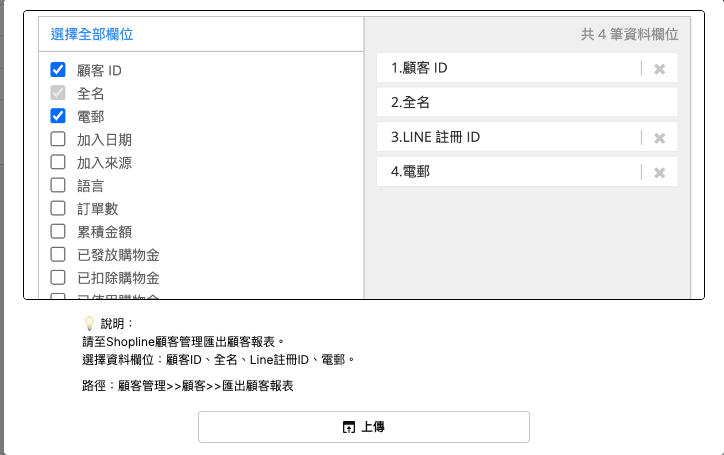
<mark style="color:orange;">**Step 2.**</mark> 選擇要匯出的資料欄位：顧客ID、全名、Line註冊ID、電郵即可（如下圖），得到「顧客報表.csv」檔案。

<figure><img src="/files/uPCq9XVJ79hpHjp7RbYs" alt=""><figcaption></figcaption></figure>

<mark style="color:orange;">**Step 3.**</mark> 登入Besparks CRM，前往設定 > 應用串接，進入下圖頁面。點選主畫面上方的下拉式選單，切換成「SHOPLINE」。

<figure><img src="/files/8asVPhU1ZhqVpcbV4ZXR" alt=""><figcaption></figcaption></figure>

<mark style="color:orange;">**Step 4.**</mark> 點選畫面下方的「上傳SHOPLINE」顧客名單，點擊下方的「上傳」，將剛才從SHOPLINE上抓取的顧客報表檔案匯入。

<figure><img src="/files/EjGN5QHnZb3Y0Gjdec91" alt=""><figcaption></figcaption></figure>

<mark style="color:orange;">**Step 5.**</mark> 匯入檔案後，系統將自動代入您的SHOPLINE商店名稱、代號、Logo及官網URL，並顯示顧客名單已導入，即表示串接完成。

<figure><img src="/files/jOzsKaXCbyniAzT4v2MY" alt=""><figcaption></figcaption></figure>


---

# Agent Instructions
This documentation is published with GitBook. GitBook is the documentation platform designed so that both humans and AI agents can read, navigate, and reason over technical content effectively. Learn more at gitbook.com.

## Querying This Documentation
If you need additional information that is not directly available in this page, you can query the documentation dynamically by asking a question.

Perform an HTTP GET request on the current page URL with the `ask` query parameter:

```
GET https://docs.besparks.co/besparks-crm-gong-neng-mo-zu-shuo-ming/app-setup/app-setup-shopline.md?ask=<question>
```

The question should be specific, self-contained, and written in natural language.
The response will contain a direct answer to the question and relevant excerpts and sources from the documentation.

Use this mechanism when the answer is not explicitly present in the current page, you need clarification or additional context, or you want to retrieve related documentation sections.