> For the complete documentation index, see [llms.txt](https://docs.besparks.co/llms.txt). Markdown versions of documentation pages are available by appending `.md` to page URLs; this page is available as [Markdown](https://docs.besparks.co/besparks-crm-gong-neng-mo-zu-shuo-ming/marketing-automation/keyword-autoreply.md).
# 關鍵字自動回覆
Bespark CRM 支援聊天時客戶傳送 「 關鍵字」 後,系統自動回覆。目前可應用於LINE 官方帳號渠道上。
## 自動回覆列表
 1. **搜尋欄:**輸入「**活動名稱**」可查找已建立的自動回覆(輸入完畢後請按**Enter**進行查詢)
2. [**建立新的自動回覆**](#xin-zeng-tiao-jian-de-she-ding-hua-mian)
3. **活動名稱:**建立後可方便搜尋,Line用戶端客戶不會看到該活動名稱。
4. **狀態:**可看到該自動回覆的狀態在前台為「啟用中」 / 「關閉中」
5. **觸發關鍵字:**可看到已設定用來觸發「自動回覆」的關鍵字
6. **回覆內容:**可看到設定好的觸發內容。包含「文字訊息」與「機器人對話模組」。
* 若為文字訊息,則會顯示已儲存的文字回覆內容
* 若為機器人,則會顯示「機器人對話模組」
7. **次數統計:**可看到此自動回覆在用戶端被觸發了幾次
8. **SHOPLINE貼標內容:**觸發此自動回覆會幫用戶貼的標籤內容(選填)
9. **編輯 🖊:**修改已儲存的自動回覆\
**刪除 🗑:**刪除已儲存的自動回覆
***
## 新增條件的設定畫面
1. **搜尋欄:**輸入「**活動名稱**」可查找已建立的自動回覆(輸入完畢後請按**Enter**進行查詢)
2. [**建立新的自動回覆**](#xin-zeng-tiao-jian-de-she-ding-hua-mian)
3. **活動名稱:**建立後可方便搜尋,Line用戶端客戶不會看到該活動名稱。
4. **狀態:**可看到該自動回覆的狀態在前台為「啟用中」 / 「關閉中」
5. **觸發關鍵字:**可看到已設定用來觸發「自動回覆」的關鍵字
6. **回覆內容:**可看到設定好的觸發內容。包含「文字訊息」與「機器人對話模組」。
* 若為文字訊息,則會顯示已儲存的文字回覆內容
* 若為機器人,則會顯示「機器人對話模組」
7. **次數統計:**可看到此自動回覆在用戶端被觸發了幾次
8. **SHOPLINE貼標內容:**觸發此自動回覆會幫用戶貼的標籤內容(選填)
9. **編輯 🖊:**修改已儲存的自動回覆\
**刪除 🗑:**刪除已儲存的自動回覆
***
## 新增條件的設定畫面
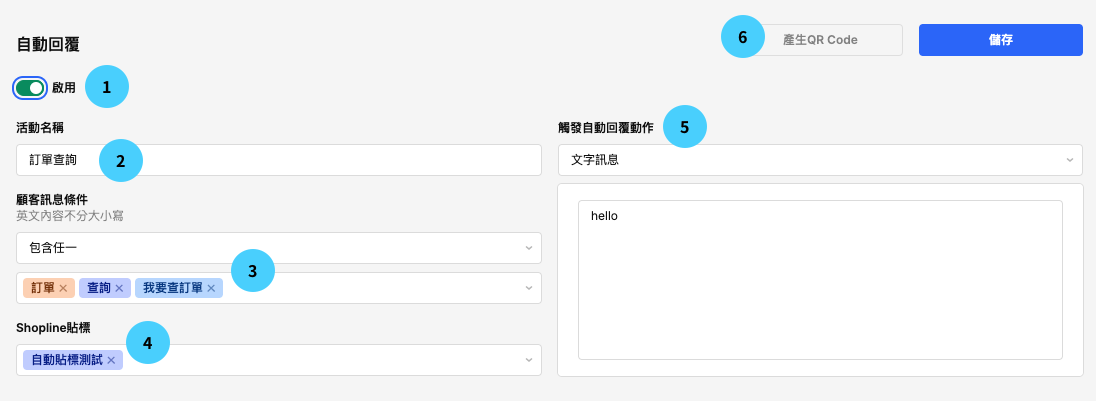 1. **啟用/關閉**:可以『開啟』 或 『關閉』 此關鍵字條件。
2. **活動名稱**:記錄此自動回覆的用途(例如:會員優惠、歡迎新客、XX檔期活動等)
3. **顧客訊息條件:**設定當LINE用戶端傳送關鍵字為什麼內容,即可觸發自動回覆。
4. SHOPLINE貼標:當LINE用戶端觸發關鍵字回覆時,會將標籤自動貼到用戶的官網會員資料中。
5. **觸發自動回覆動作**: 當LINE用戶端觸發關鍵字後,將收到什麼回覆內容。 可選擇回覆內容類型為:文字訊息、機器人模組、不回覆消息。
{% hint style="info" %}
設定時請留意:英文字母與數字符號的**全形及半形,**在系統中均視為不同的字元;大、小寫不區分,均視為相同 舉例來說:
`情況一:ABC` (半形) ,`ABC` (全形) ,兩種為不一樣的關鍵字
情況二:ABC(大寫)、abc(小寫),這兩種為相同的關鍵字
情況三:關鍵字設定為 **`Abc(半形)`**, 客人打出 **`ABC`** > 這個會觸發關鍵字自動回覆; 客人打出 **`ABC`**(全形)> 不會觸發關鍵字自動回覆
{% endhint %}
6. **關鍵字QRcode**:可生成帶有一個關鍵字的QRcode使用在行銷活動中。
## 觸發動作設定畫面
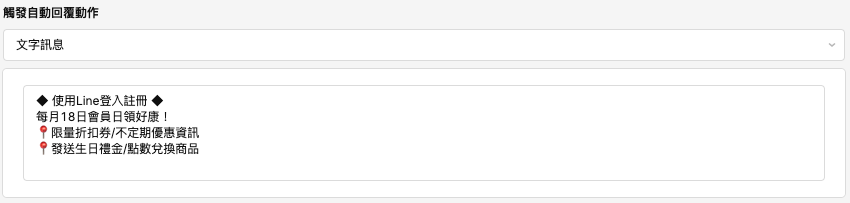
當客戶觸發關鍵字後,將收到什麼回覆內容。
可選擇回覆內容類型為:**文字訊息、機器人模組、不回覆消息(通常配合貼標籤功能使用)**。
### **文字訊息**
1. **啟用/關閉**:可以『開啟』 或 『關閉』 此關鍵字條件。
2. **活動名稱**:記錄此自動回覆的用途(例如:會員優惠、歡迎新客、XX檔期活動等)
3. **顧客訊息條件:**設定當LINE用戶端傳送關鍵字為什麼內容,即可觸發自動回覆。
4. SHOPLINE貼標:當LINE用戶端觸發關鍵字回覆時,會將標籤自動貼到用戶的官網會員資料中。
5. **觸發自動回覆動作**: 當LINE用戶端觸發關鍵字後,將收到什麼回覆內容。 可選擇回覆內容類型為:文字訊息、機器人模組、不回覆消息。
{% hint style="info" %}
設定時請留意:英文字母與數字符號的**全形及半形,**在系統中均視為不同的字元;大、小寫不區分,均視為相同 舉例來說:
`情況一:ABC` (半形) ,`ABC` (全形) ,兩種為不一樣的關鍵字
情況二:ABC(大寫)、abc(小寫),這兩種為相同的關鍵字
情況三:關鍵字設定為 **`Abc(半形)`**, 客人打出 **`ABC`** > 這個會觸發關鍵字自動回覆; 客人打出 **`ABC`**(全形)> 不會觸發關鍵字自動回覆
{% endhint %}
6. **關鍵字QRcode**:可生成帶有一個關鍵字的QRcode使用在行銷活動中。
## 觸發動作設定畫面
當客戶觸發關鍵字後,將收到什麼回覆內容。
可選擇回覆內容類型為:**文字訊息、機器人模組、不回覆消息(通常配合貼標籤功能使用)**。
### **文字訊息**
 ### **機器人模組**
可選擇在[**「機器人模組」**](/besparks-crm-gong-neng-mo-zu-shuo-ming/marketing-automation/chatbot.md)中已經儲存的機器人,並指定希望觸發的對話模組
### **機器人模組**
可選擇在[**「機器人模組」**](/besparks-crm-gong-neng-mo-zu-shuo-ming/marketing-automation/chatbot.md)中已經儲存的機器人,並指定希望觸發的對話模組
 ### 不回覆消息
該動作主要是針對觸發關鍵字活動時可以同步貼標,旨在為用戶貼標,方便在SHOPLINE電商後台分群。
### 不回覆消息
該動作主要是針對觸發關鍵字活動時可以同步貼標,旨在為用戶貼標,方便在SHOPLINE電商後台分群。
 ***
## 顧客訊息條件
設定當客戶傳送關鍵字為什麼內容,即可觸發自動回覆,至少一定要設定一組關鍵字。
* **建立關鍵字**:輸入關鍵字後,請按一次Enter,關鍵字就會被成功建立
* **取消關鍵字:**點選關鍵字後的「X」,或取消下方清單中的「✔️」,就可取消關鍵字。取消的關鍵字將會從欄位中直接刪除。
***
## 顧客訊息條件
設定當客戶傳送關鍵字為什麼內容,即可觸發自動回覆,至少一定要設定一組關鍵字。
* **建立關鍵字**:輸入關鍵字後,請按一次Enter,關鍵字就會被成功建立
* **取消關鍵字:**點選關鍵字後的「X」,或取消下方清單中的「✔️」,就可取消關鍵字。取消的關鍵字將會從欄位中直接刪除。
 ## 關鍵字 QR Code 運用
{% hint style="info" %}
關鍵字 QRCode 僅支援**一個關鍵字**,若同時有多個關鍵字無法產生 QRCode
{% endhint %}
Step 1. 設定關鍵字條件(只能包含 「一個 」 關鍵字),完成後點選上方「產生QRcode」按鈕
## 關鍵字 QR Code 運用
{% hint style="info" %}
關鍵字 QRCode 僅支援**一個關鍵字**,若同時有多個關鍵字無法產生 QRCode
{% endhint %}
Step 1. 設定關鍵字條件(只能包含 「一個 」 關鍵字),完成後點選上方「產生QRcode」按鈕
 Step 2. 畫面將跳出QRcode,可選擇直接「下載」或右方「🔗」圖示複製連結就能夠使用在行銷活動中。
 Step 3. 消費者掃描 QRcode 會在對話輸入框出現設定好的關鍵字詞,當消費者發送關鍵字,就會觸發已經設定好的自動回覆內容。
 {% hint style="info" %}
若自動回覆內容的「關鍵字」有更動,**需要重新產生QRcode和連結**置入行銷活動,舊的連結與QRcode將會失效。
{% endhint %}
{% hint style="info" %}
若自動回覆內容的「關鍵字」有更動,**需要重新產生QRcode和連結**置入行銷活動,舊的連結與QRcode將會失效。
{% endhint %}