> For the complete documentation index, see [llms.txt](https://docs.besparks.co/llms.txt). Markdown versions of documentation pages are available by appending `.md` to page URLs; this page is available as [Markdown](https://docs.besparks.co/besparks-crm-gong-neng-mo-zu-shuo-ming/member-management.md).

# 人員管理

使用者管理列表可讓您新增與管理團隊成員

<figure><img src="/files/GYlRhxi9sUDfLYSGp0dl" alt=""><figcaption></figcaption></figure>

## 登入BeSparks CRM

<figure><img src="/files/XnvYidqiC9MmNj5djCZK" alt=""><figcaption></figcaption></figure>

若使用者已被成功加入團隊，則可通過SHOPLINE擴充商店後台前往登入頁面

## 新增團隊成員

點選列表右上方「新增」按鈕，出現新增人員的彈窗

<figure><img src="/files/JYkGymQqgj3vInfyCYnt" alt=""><figcaption></figcaption></figure>

輸入欲新增的成員的email，系統將寄送信件請被邀請重新設定登入密碼。密碼設定後，人員就可登入系統。

<figure><img src="/files/KLCL1LGpM0UH1af2Tskh" alt="" width="375"><figcaption></figcaption></figure>

<figure><img src="/files/BivoIlN7NFAI9cJwm2uP" alt=""><figcaption></figcaption></figure>

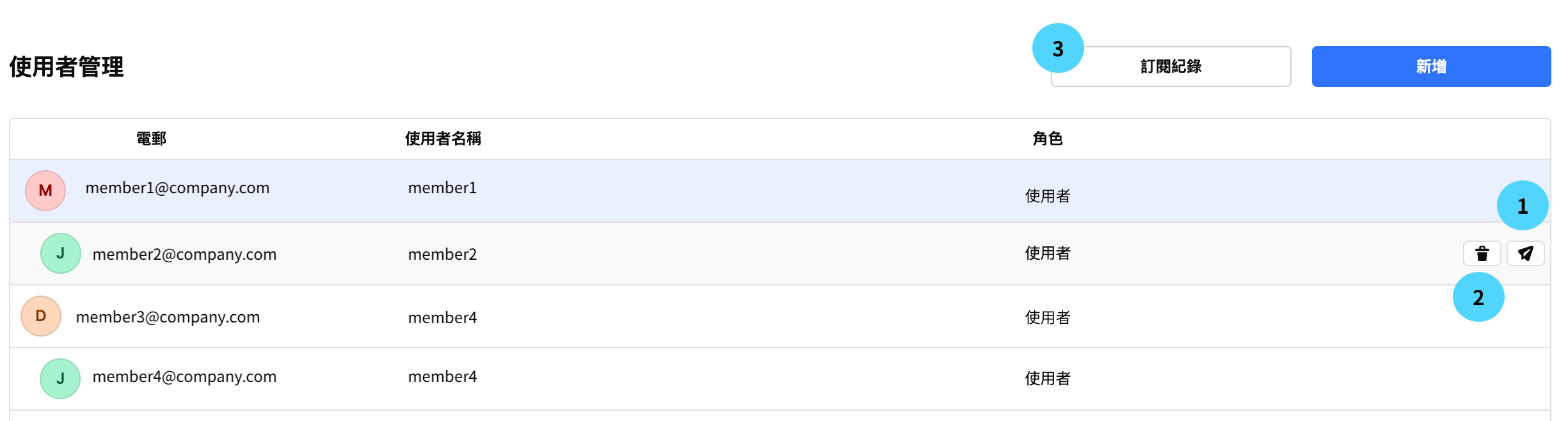
1. **重設密碼：**&#x82E5;被邀請者沒有收到email、或使用者忘記密碼，可請其他使用者於列表最右方點選「重設密碼」，系統將重新寄送密碼設定信件給該使用者。
2. **刪除使用者：**&#x82E5;使用者已不存在或已不使用現有的email，可於使用者管理列表最右方點選「刪除」
3. **訂閱紀錄：**&#x53EF;看到目前您的電商帳號購買的方案費用與到期日。

<figure><img src="/files/WVxz86tP48ratpeUI5eg" alt=""><figcaption></figcaption></figure>

{% hint style="warning" %}
若方案期限到期，系統<mark style="color:orange;">**將自動停止所有使用者登入權限**</mark>，請務必至少於到期日前一天確認是否需要續約以及備份資料，以免影響您的使用權益。
{% endhint %}


---

# Agent Instructions
This documentation is published with GitBook. GitBook is the documentation platform designed so that both humans and AI agents can read, navigate, and reason over technical content effectively. Learn more at gitbook.com.

## Querying This Documentation
If you need additional information that is not directly available in this page, you can query the documentation dynamically by asking a question.

Perform an HTTP GET request on the current page URL with the `ask` query parameter:

```
GET https://docs.besparks.co/besparks-crm-gong-neng-mo-zu-shuo-ming/member-management.md?ask=<question>
```

The question should be specific, self-contained, and written in natural language.
The response will contain a direct answer to the question and relevant excerpts and sources from the documentation.

Use this mechanism when the answer is not explicitly present in the current page, you need clarification or additional context, or you want to retrieve related documentation sections.